
1.4 My Customers
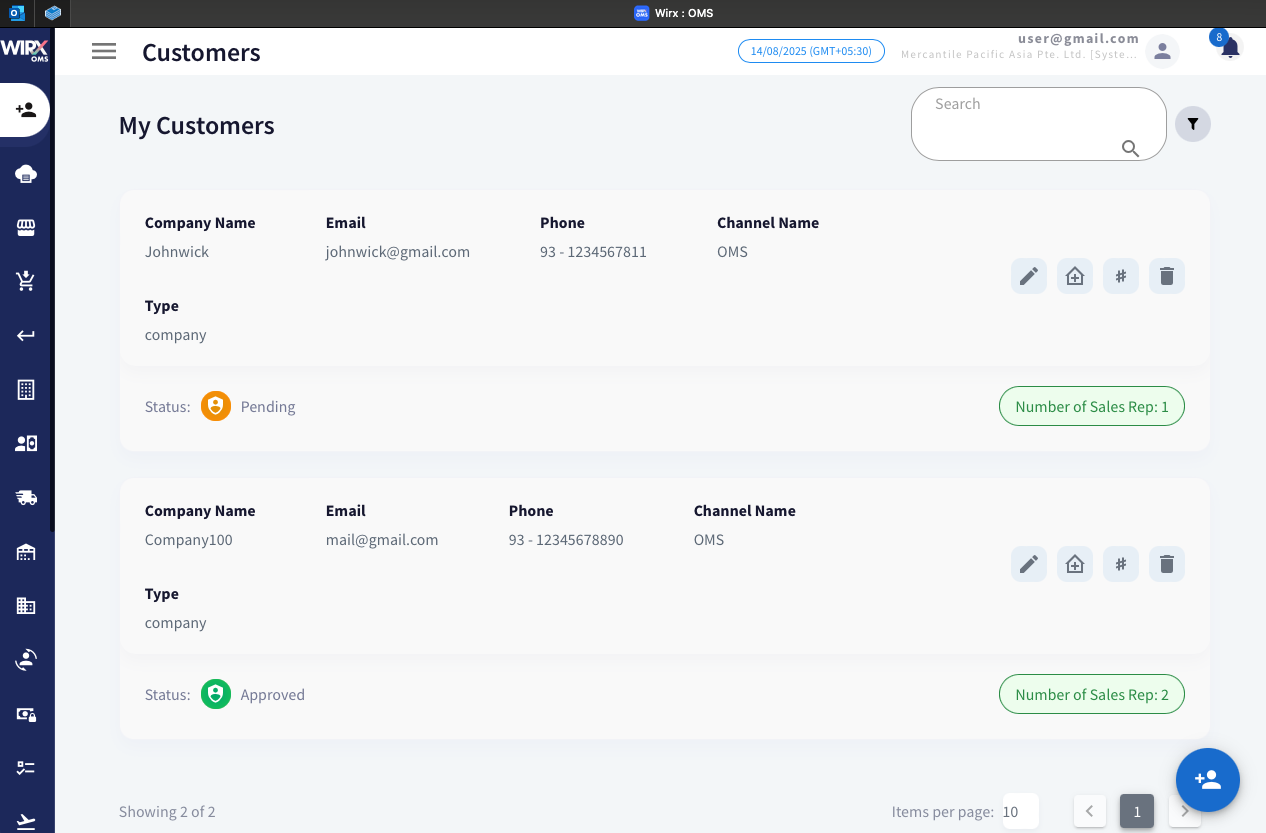
The My Customers section displays a list of customers assigned specifically to the logged-in user. This feature helps sales representatives and account managers focus on their own portfolio of customers without browsing through the entire database.
Displayed Information
For each customer, the following details are shown:
-
Company Name – The registered business name of the customer.
-
Email – The customer’s primary contact email address.
-
Phone – The registered phone number.
-
Channel Name – The sales or operational channel to which the customer is linked (e.g., OMS).
-
Type – Customer classification (e.g., company, individual).
-
Status – Indicates the current approval state of the customer:
-
ICON Status Overview 
Pending
The customer’s details are under review and awaiting approval.
Approved
The customer has passed verification and is authorized for transactions.
Rejected
Compliance requirements not met. -
Number of Sales Representatives – Shows how many sales reps are assigned to the customer.
Features and Actions
-
Search Bar – Quickly find customers by name, email, or other details.
-
Filter Option – Apply filters to narrow down the customer list based on criteria such as status or channel.
-
Action Buttons (per customer record):
-
ICON NAME Action Edit Modify existing customer details such as name, contact information, and channel. Manage Address Add, edit, or update the customer's billing and shipping addresses. Update NS Internal ID Update the customer's NetSuite Internal ID for system integration purposes. Delete Customer Permanently remove the customer record from the system.
Create Customer Add a new customer by entering relevant details and compliance information.
-



No comments to display
No comments to display