1.3 All Customers
- Displays the complete list of customers in the system.
- Allows filtering, searching, and sorting customers.
- Useful for accessing full customer records.
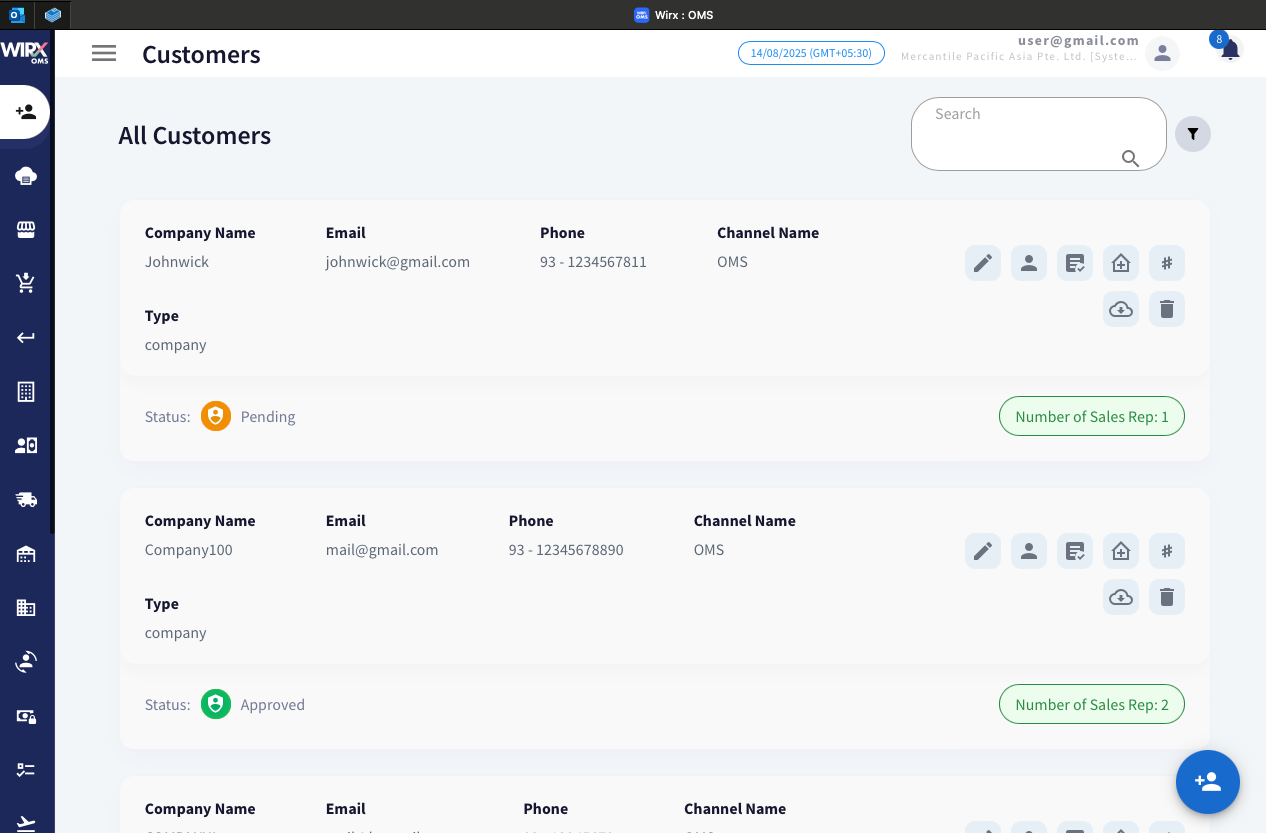
Features and Actions
Search Bar – Allows quick keyword-based searching for customers by name, email, or other details.
Filter Option – Enables applying filters to narrow down the displayed customer list based on specific criteria (e.g., status, channel).
| ICON | NAME | ACTION |
 |
Edit | Modify existing customer details such as name, contact information, and channel. |
 |
Customer Type | Specify the customer type (e.g., Premium, Activation) and set the associated expiry date. |
 |
Assign Sales Rep | Assign one or more sales representatives to manage the customer. |
 |
Manage Address | Add, edit, or update the customer's billing and shipping addresses. |
 |
Update NS Internal ID | Update the customer's NetSuite Internal ID for system integration purposes. |
 |
Download Certificate | Download any customer-provided proof or compliance certificates stored in the system. |
 |
Delete Customer |
Permanently remove the customer record from the system. |
 |
Create Customer | Add a new customer by entering relevant details and compliance information. |